For golf enthusiasts seeking to elevate their game, the market for personal launch monitors has undergone a massive transformation. Not long ago, obtaining accurate data on ball speed, launch angle, and spin required spending tens of thousands of dollars on commercial-grade systems like TrackMan or Foresight. Today, golf tech manufacturers have packed professional-grade radar and camera tracking systems into portable units that fit in your golf bag for a fraction of the cost.
If you are shopping with a budget of under $1,000, you are in the sweet spot for consumer golf technology. In this price range, you are no longer limited to basic speed trackers; instead, you can purchase fully simulator-capable launch monitors that track advanced metrics, capture swing video, and sync with software to let you play virtual courses in your garage or backyard.
However, selecting the best golf launch monitor under $1,000 depends heavily on your specific practice setup. Do you plan to use it primarily indoors, outdoors at the driving range, or as the engine for a home simulator? Are you willing to pay an annual subscription for advanced metrics, or do you prefer a one-time purchase with no recurring fees?
In this comprehensive guide, we review the top-rated golf launch monitors under $1,000, compare their tracking technologies, outline space requirements, and help you choose the perfect unit for your practice goals.
For golfers on a tighter budget, check out our Best Golf Launch Monitor Under $500 guide, and if you’re building a dedicated indoor space, read our guide on Best Golf Launch Monitors for Home Practice.
Quick Comparison of the Best Golf Launch Monitors Under $1,000
Before diving into the detailed reviews, this table outlines the main differences in tracking technology, key metrics, simulator compatibility, and the general price bracket for each unit.
| Product | Best For | Tracking Tech | Key Metrics | Simulator Apps | Price Bracket |
|---|---|---|---|---|---|
| Rapsodo MLM2PRO | Video Analysis & Spin Accuracy | Dual Camera + Doppler Radar | Spin Rate, Spin Axis, Carry, Ball Speed, Launch Angle | E6 Connect, Awesome Golf, Rapsodo Link | Under $700 |
| Garmin Approach R10 | Simulator Library & Data Depth | Doppler Radar | 14+ Metrics (Club Path, Face Angle, Carry, etc.) | Home Tee Hero, E6 Connect, Awesome Golf, TGC 2019 | Under $600 |
| Swing Caddie SC4 | Standalone Simplicity | Doppler Radar + Barometer | Carry, Total Distance, Launch Angle, Apex, Spin | E6 Connect, OptiShot Orion | Under $550 |
| FlightScope Mevo | Ultimate Portability | 3D Doppler Radar | Carry, Club/Ball Speed, Smash Factor, Launch Angle, Spin | FS Golf App, E6 Connect (limited) | Under $500 |
| PRGR Black (HS-130A) | Simple Speed Training | Doppler Radar | Club Speed, Ball Speed, Smash Factor, Carry (est.) | None | Under $200 |
1. Rapsodo MLM2PRO — Best for Video Analysis and Spin Accuracy
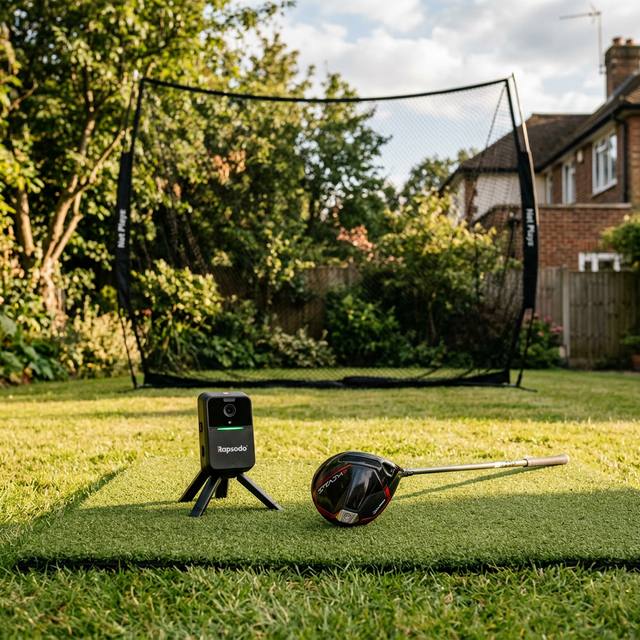
The Rapsodo MLM2PRO is the direct successor to the highly popular Mobile Launch Monitor (MLM). Rapsodo redesigned this unit from the ground up, combining high-speed cameras with Doppler radar to create a hybrid tracking system that excels in both indoor and outdoor environments.
Check current Rapsodo MLM2PRO price on Amazon
Why It Works
The standout feature of the MLM2PRO is its dual-camera system. The Shot Vision camera provides a down-the-line view of your swing with an overlay shot tracer, while the Impact Vision camera captures a slow-motion video of your club face colliding with the ball at 240 frames per second. This visual feedback is incredibly valuable for golfers working on their strike quality or trying to diagnose a hook or slice.
Furthermore, Rapsodo partnered with Callaway to solve the historic weakness of budget radar units: indoor spin tracking. By using the included custom-patterned Callaway RPT (Real-time Spin Decrypted) balls, the MLM2PRO’s cameras can track the exact rotation of the ball. This allows the unit to measure spin rate and spin axis directly, rather than relying on mathematical calculations.
Space & Setup Requirements
Because the MLM2PRO uses a combination of radar and cameras, it requires a specific layout when practicing indoors:
- Position the MLM2PRO 6.5 to 8.5 feet directly behind the ball.
- Ensure at least 8 feet of ball flight from the ball to your net or impact screen.
- Maintain adequate, even lighting so the cameras can track the ball pattern.
 Best for Video Analysis
 Rapsodo
Rapsodo MLM2PRO Mobile Launch Monitor
Direct spin measurement via Callaway RPT balls and dual-camera swing recording.
Pros:
- Measures actual spin rate and spin axis (no estimation) using Callaway RPT balls.
- Slow-motion club-impact video provides immediate swing feedback.
- Supports both iOS and Android platforms with a polished user interface.
- Excellent simulation capabilities with local courses and third-party apps like E6 Connect.
Cons:
- Requires an annual Premium Membership subscription to unlock advanced features after the first year.
- Camera tracking requires good lighting conditions for indoor use.
2. Garmin Approach R10 — Best Simulator Library and Overall Value
The Garmin Approach R10 changed the landscape of budget golf launch monitors by offering a comprehensive metric suite and extensive simulator support for under $600. It remains one of the most popular and versatile units on the market.
Check current Garmin Approach R10 price on Amazon
Why It Works
The Approach R10 tracks more than a dozen metrics, including club head speed, ball speed, launch angle, launch direction, carry distance, and total distance. Crucially, it also provides estimated club metrics such as club path, face angle, and angle of attack. While these club metrics are calculated rather than measured directly, they give players an indication of their swing dynamics.
Where the Garmin R10 truly shines is its software compatibility. Through the Garmin Golf app, you can access Home Tee Hero, which allows you to play 3D virtual rounds on over 42,000 real golf courses worldwide. Additionally, the R10 has direct integrations with industry-standard simulator software like E6 Connect, Awesome Golf, and The Golf Club 2019 (TGC 2019), allowing you to build a full-scale home golf simulator on a budget.
Space & Setup Requirements
As a pure Doppler radar unit, the Garmin R10 needs space to trace the ball’s flight path:
- Place the unit 6 to 8 feet directly behind the ball.
- Ensure at least 8 feet of clear ball flight in front of the hitting area.
- Keep the area between the unit and the ball clear of metal objects, fans, or concrete floors that can cause signal interference.
 Best Simulator Integration
 Garmin
Garmin Approach R10 Portable Launch Monitor
Massive library of 42,000+ virtual courses and calculated club data metrics.
Pros:
- Outstanding battery life of up to 10 hours on a single charge.
- Tracks a massive array of metrics, including calculated club path and face angle data.
- Massive simulator support across multiple platforms.
- Includes a convenient phone mount that clips onto your golf bag.
Cons:
- Radar-based tracking can struggle in tight indoor environments without proper calibration.
- Spin rate and spin axis are calculated rather than directly measured.
3. Swing Caddie SC4 — Best Standalone Launch Monitor
If you want a modern launch monitor that can serve as a home simulator engine but also operates as a simple, standalone range companion, the Swing Caddie SC4 from Voice Caddie is your best choice.
Check current Swing Caddie SC4 price on Amazon
Why It Works
Unlike the Garmin R10 and Rapsodo MLM2PRO, which require a connected smartphone or tablet to display your data, the Swing Caddie SC4 features a large, high-contrast LCD screen on the front of the device. You can place the SC4 behind you at the driving range, hit a shot, and immediately read your carry distance, ball speed, launch angle, and smash factor directly from the screen. It also features a voice output system that reads your yardages aloud, allowing you to practice without interrupting your rhythm.
When you do want a richer experience, the SC4 connects via Bluetooth to the MySwingCaddie app to display spin rates, apex, and 3D shot trajectories. The SC4 is also simulator-capable, featuring a direct integration with E6 Connect and OptiShot Orion, making it a dual-use unit that transitions seamlessly from the range to the garage.
Space & Setup Requirements
- Position the SC4 5 feet directly behind the ball.
- Ensure at least 8 feet of flight path for indoor net sessions.
- Alignment is simplified by the unit’s built-in casing, making it easier to set up at the range than radar units that sit on thin tripods.
Best Standalone Unit Voice Caddie
Swing Caddie SC4 Launch Monitor & Simulator
High-contrast built-in display and voice output for direct, app-free practice.
Pros:
- Large, readable built-in display removes the need for constant phone checking.
- Voice output reads carry distance immediately after each swing.
- Simpler alignment and setup process compared to other radar units.
- Includes one free license for E6 Connect simulator software.
Cons:
- Fewer club-specific metrics compared to the Garmin Approach R10.
- Device is physically larger and heavier than its competitors.
4. FlightScope Mevo — Best for Portability and Focused Practice
FlightScope is a legendary name in professional golf tracking, and the Mevo (Gen 2) brings their military-grade 3D Doppler radar technology down to a highly accessible consumer price point.
Check current FlightScope Mevo price on Amazon
Why It Works
The FlightScope Mevo is about the size of an Altoids tin, making it by far the most portable unit on this list. It slips easily into any pocket of your golf bag and sets up in seconds. Despite its tiny size, the Mevo is a serious practice tool. It focuses on eight key metrics: carry distance, club head speed, ball speed, smash factor, launch angle, spin rate, apex height, and flight time.
FlightScope’s FS Golf app is highly praised for its clean, professional layout. It focuses on data tables, progress charts, and skills challenges. If you are a player who wants to head to the driving range, track your club gapping, and run structured skills practice without the distractions of virtual avatars or game screens, the Mevo is built for you.
Space & Setup Requirements
- Place the Mevo 4 to 7 feet directly behind the ball.
- Indoors, it requires at least 8 feet of ball flight.
- For accurate indoor spin tracking, FlightScope recommends placing the included small metallic stickers (metallic dots) onto your golf balls.
 Best for Portability
 FlightScope
FlightScope Mevo Portable Launch Monitor
Military-grade 3D Doppler radar tracking in an ultra-compact, pocket-sized design.
Pros:
- Extremely small and portable footprint.
- Highly accurate carry distance tracking on outdoor ranges.
- No annual subscription required to access the core FS Golf app features.
- The FS Skills App offers structured target challenges to gamify your range sessions.
Cons:
- Does not track shot direction, lateral deviation, or club path.
- Requires placing metallic stickers on balls for accurate indoor spin tracking.
5. PRGR Black — Best Budget Speed Training Tool
The PRGR Black (HS-130A) is not a full-scale simulator or a multi-camera launch monitor. It is a highly specialized, pocket-sized radar unit designed to do one thing exceptionally well: measure club head speed and ball speed at a very affordable price.
Check current PRGR portable monitor price on Amazon
Why It Works
The PRGR is unique because it uses a liquid crystal display to show your speed data instantly, and it does not require a hitting net, an app, or even a golf ball to function. This makes it the absolute best tool for overspeed training systems like SuperSpeed Golf. You can swing a weighted stick in your backyard or living room, and the PRGR will display your club head speed instantly.
When you do hit balls, it tracks ball speed and uses a mathematical algorithm to estimate your carry distance and total distance. While it won’t show you your launch angle or shot shape, it is a highly reliable gapping tool for players who mainly want to ensure their distance control is consistent.
Space & Setup Requirements
- Position the PRGR 3 to 5 feet directly behind the hitting area.
- No ball flight is required if you are only measuring club head speed.
- It operates on simple AAA batteries, meaning you never have to worry about charging it before a practice session.
Best Value Speed Tracker PRGR
PRGR Portable Launch Monitor Black
Reads club head speed without requiring a ball, making it the perfect tool for speed training.
Pros:
- Extremely affordable price point.
- Measures dry swings (no ball contact required), making it perfect for speed training programs.
- Simple, battery-powered operation with zero app configuration.
- Compact size fits easily in a pocket.
Cons:
- Does not track launch angle, spin rate, direction, or lateral curve.
- Carry and total distances are estimated based on ball and club speed.
Guide to Choosing: How to Buy the Right Launch Monitor Under $1,000
Selecting the right launch monitor requires looking beyond the spec sheets. You must evaluate how the device’s tracking technology aligns with your training environment and software preferences.
1. Radar vs. Camera Technology
The tracking method dictates where the unit must be placed and how it gathers data:
- Doppler Radar (Garmin R10, FlightScope Mevo, Swing Caddie SC4): These units sit behind the ball and track the ball’s flight over a distance. They are fantastic outdoors because they can see the entire ball flight. Indoors, however, they can suffer from limited space. If the radar only has 8 feet of ball flight to read, it must calculate spin based on short-range speed and launch dynamics.
- Camera-Hybrid (Rapsodo MLM2PRO): This unit uses high-speed cameras to photograph the ball immediately after impact. Indoors, this is a major advantage because the camera can capture spin directly using marked balls (like the Callaway RPT), even in a confined space.
2. Indoor Space Constraints
If you plan to set up a home golf net or simulator in a garage, basement, or spare room, you must measure your space carefully. Doppler radar units placed behind the golfer require a long room:
- Unit to Ball: 6 to 8 feet
- Ball to Screen/Net: 8 feet minimum (10 feet is better for accuracy)
- Total Room Length: At least 15 to 18 feet of unobstructed depth.
If your space is shorter than 15 feet, a camera-hybrid unit like the Rapsodo MLM2PRO is generally more reliable, provided you have good lighting. If you want to check similar equipment specs for baseball or football speed tracking, see our Best Baseball Radar Guns & Bat Sensors guide.
3. Subscription Fees and Long-Term Costs
When comparing prices, make sure to factor in annual subscription costs:
- Garmin Approach R10: The core metrics, driving range, and basic session tracking are free. Playing virtual courses via Home Tee Hero requires a Garmin Golf subscription (around $9.99/month or $99/year).
- Rapsodo MLM2PRO: The unit includes a 1-year trial of the Premium Membership. After the first year, it costs $199/year to maintain access to advanced features like slow-motion Impact Vision video, spin axis tracking, and cloud video storage.
- FlightScope Mevo & PRGR: No subscription required. You get lifetime access to all metrics and the standard practice apps.
4. Simulator Workflow
Are you trying to project a course onto a screen, or are you happy looking at a tablet on a stand?
- If you want a full simulator setup (projector, hitting screen, PC software), choose the Garmin R10 or Rapsodo MLM2PRO due to their integrations with E6 Connect, TGC 2019, and Awesome Golf.
- If you want a quick, cable-free range setup where you can hit balls and get instant numbers, choose the Swing Caddie SC4 or PRGR for their built-in displays.
Sources & Manufacturer Resources
For detailed technical specifications, firmware updates, and app compatibility lists, visit the official manufacturer pages:
- Rapsodo MLM2PRO Official Support
- Garmin Approach R10 Product Details & Specs
- FlightScope Mevo Gen2 Support & Manuals
- Voice Caddie Swing Caddie SC4 Manual
What is the most accurate golf launch monitor under $1,000?
For indoor use, the Rapsodo MLM2PRO is the most accurate because it uses high-speed cameras to measure spin rate and spin axis directly with Callaway RPT balls. For outdoor use, the FlightScope Mevo and Garmin R10 provide comparable accuracy for carry distance and speed metrics.
Do I need special balls to get spin numbers under $1,000?
The Rapsodo MLM2PRO requires Callaway RPT balls (included in the box) to measure spin rate and spin axis. The FlightScope Mevo requires placing a small metallic dot (included) on your golf balls for indoor spin tracking. The Garmin R10 calculates spin estimates using radar algorithm calculations, so special balls are not required.
Can I use these launch monitors in a garage or basement?
Yes, but you must ensure you have enough room length. Most radar units require at least 15 to 18 feet of total length (6-8 feet behind the ball and 8-10 feet of ball flight to the net). Additionally, make sure your ceiling is high enough to swing your driver comfortably (typically 9 to 10 feet).
Which launch monitor is best for speed training without a ball?
The PRGR Portable Launch Monitor is the best and most reliable unit for speed training. Unlike other launch monitors, it can track your club head speed with dry swings (without hitting a ball), making it the ideal tool to pair with overspeed training sticks like SuperSpeed Golf.
Can I play real courses on a simulator with these units?
Yes. The Garmin Approach R10, Rapsodo MLM2PRO, and Swing Caddie SC4 all offer integrations with simulator software such as E6 Connect, Awesome Golf, and proprietary apps, allowing you to play thousands of virtual courses.
How we evaluate: We combine manufacturer documentation, independent user feedback, and parent-focused criteria like safety, durability, ease of use, and long-term value.
Accuracy note: Pricing and product availability can change. Verify details on the retailer site before purchase.
Affiliate Disclosure: Sports Gadget Review is a participant in the Amazon Services LLC Associates Program. When you purchase through links on this page, we may earn a commission at no extra cost to you. Editorial recommendations are made independently.